

16 Mar, 26
What makes a good donation system for a game server?
A good donation system should do more than just collect payments. It should help server owners create a smooth and trustworthy experience for players while reducing the amount of manual work required to manage purchases and rewards. We'll discuss in this article on why Tip4Serv is the strongest choice for a donation platform.
In practice, the best donation platforms for game servers usually combine five essential elements:
- Easy setup: server owners should be able to launch a store quickly without needing coding knowledge or complex configuration.
- Secure payment processing: players need a checkout experience that feels safe, simple, and familiar.
- Automated reward delivery: ranks, items, and perks should be delivered automatically to save time for everyone and avoid mistakes.
- Webstore customization: the store should match the server’s identity and escape generic designs.
- A strong player experience: supporting a server should feel rewarding, not confusing or frustrating.
If one of these elements is missing, server owners often end up wasting time on manual tasks, losing conversions and revenue or creating a poor experience for players. That is why choosing the right donation system is not just a technical decision. It directly affects revenue, retention, and community trust.
What is the best way to accept donations for a game server?
The best way to accept donations for a game server is to use a dedicated platform that combines payments, automation, and storefront management in one place.
Manual donation workflows often create unnecessary friction. Players may not know what they are receiving, server owners have to verify payments themselves, and rewards can be delayed or delivered incorrectly. Over time, this leads to more support requests, lower conversion rates, and a less professional image for the server.
A dedicated donation platform solves these issues by giving server owners a structured webstore where players can browse packages, complete payments, and receive perks automatically. This creates a better experience for both sides: players get a faster and clearer checkout process, and server owners save time while monetizing more efficiently.
For many communities, this is exactly why platforms like Tip4Serv are such a strong fit. They simplify the entire donation process and make it much easier to turn player support into a sustainable system.
How to monetize a game server with Tip4Serv
Once you have chosen a dedicated donation platform, the next step is setting up a system that lets players support your server easily while allowing you to manage products, payments, and reward delivery efficiently. With Tip4Serv, the process is designed to be simple, even for server owners with limited technical experience.
Here is how to monetize your game server with Tip4Serv:
Step 1: Create your Tip4Serv account
Start by creating an account on Tip4Serv. This gives you access to your dashboard, where you can manage your store, products, payment methods, and server connections.
Create your account on Tip4Serv
Step 2: Fill in your store information
After registering, set up your store details. This step is important because it defines how your webstore will appear to players. Clear store information helps create a more professional and trustworthy experience.
Step 3: Connect your game server
Next, connect your game server from your dashboard by clicking on "Servers". Tip4Serv provides instructions to help you link your server correctly so you can automate product delivery and manage player purchases more efficiently.
Step 4: Create your products
Once your server is connected, create the products you want to offer. These can include ranks, perks, supporter packages, cosmetic benefits, or other rewards designed for your community. Make sure each product is clearly named and easy for players to understand.
Create your products here or by clicking "Products" from your dashboard.
Step 5: Connect Stripe or PayPal to receive payments
To start receiving money from your webstore, connect your payment methods to Tip4Serv. You can link your Stripe or PayPal account so revenue goes directly to your own payment account.
Connect your payment gateway here or by clicking "Pay Methods" from your dashboard.
Step 6: Launch your store
Once your store information, server connection, products, and payment gateways are set up, your donation system is ready. At that point, players can support your server through your Tip4Serv webstore, and you can manage monetization from one place.
For many server owners, this is the easiest way to start monetizing a game server because it removes much of the technical friction normally involved in setting up a donation system.
What’s next?
Once your donation system is live, the next step is improving how your store converts visitors into supporters. Monetizing a game server is not only about activating payments. It is also about presenting the right products, making your offers easy to understand, and creating a smooth player experience.
To improve results, focus on these fundamentals:
- Create clear product names and categories: players should instantly understand what each package includes.
- Create discount offers: promotions can increase conversions and encourage more players to support your server. Tip4Serv includes useful tools such as gift cards, loyalty points, and coupon codes.
- Offer relevant perks: the best products are the ones your community actually values.
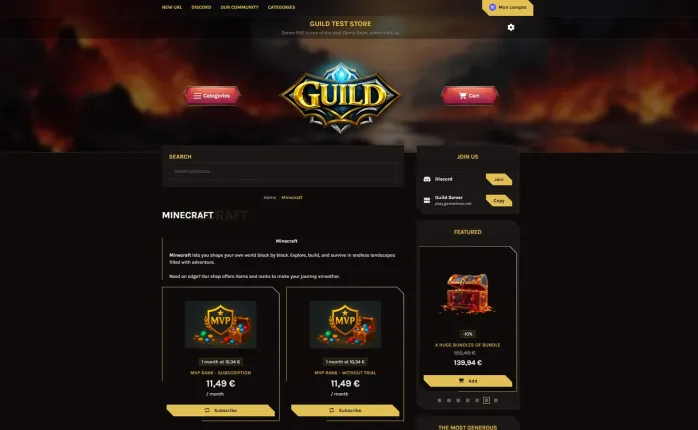
- Use a professional theme: a polished and well-designed storefront can improve trust, make products easier to browse, and help increase conversions. For server owners who want more flexibility, Tip4Serv also provides an API to support deeper theme customization.
- Build trust: a professional donation page makes players more comfortable supporting your server.
As your community grows, you can refine your products, improve your store presentation, and test which offers generate the most support. A strong donation system is not just a payment tool. It becomes part of your server’s growth strategy.
If you want a simple way to launch and manage that system, Tip4Serv gives server owners a practical starting point: fast setup, product management, payment integration, and a dedicated webstore designed for game server monetization.
✔ Automated reward delivery
✔ 25+ global payment methods
✔ Easy setup with no technical skills required
✔ Advanced store customization with many free features
✔ Discord integration
✔ Transparent pricing with no hidden fees
✔ Fast, helpful technical support

Hi, my name is Simon. I'm just a simple man making my way in the universe of pop culture and video games. I am a casual gamer that loves Dark Souls and FPS.



Simon Mawas